FlightX Canopy Passport

How the passport works

A canopy outlives many line sets and passes through many hands. The FlightX Canopy Passport, FXCP, is a logbook keyed to the wing rather than the pilot: line sets, repairs, malfunctions, jumps and hours flown. When the wing sells, the record goes with it. Like the book that comes with a car, or an aircraft logbook that outlives its owner.

The short version. A wing registered in the FlightX app builds a record as it is flown and serviced. Listing it here writes a dated PDF snapshot of that record onto the advert, so a buyer reads the history instead of taking a stranger's word for it. The live record stays with the owner until the sale, then transfers to the buyer.

Three pages from a real passport

Screens from the FlightX app, not mockups. This example wing is a JYRO Leia 72, so the app is wearing its JYRO skin and reads yellow. The record itself is the same on any canopy.
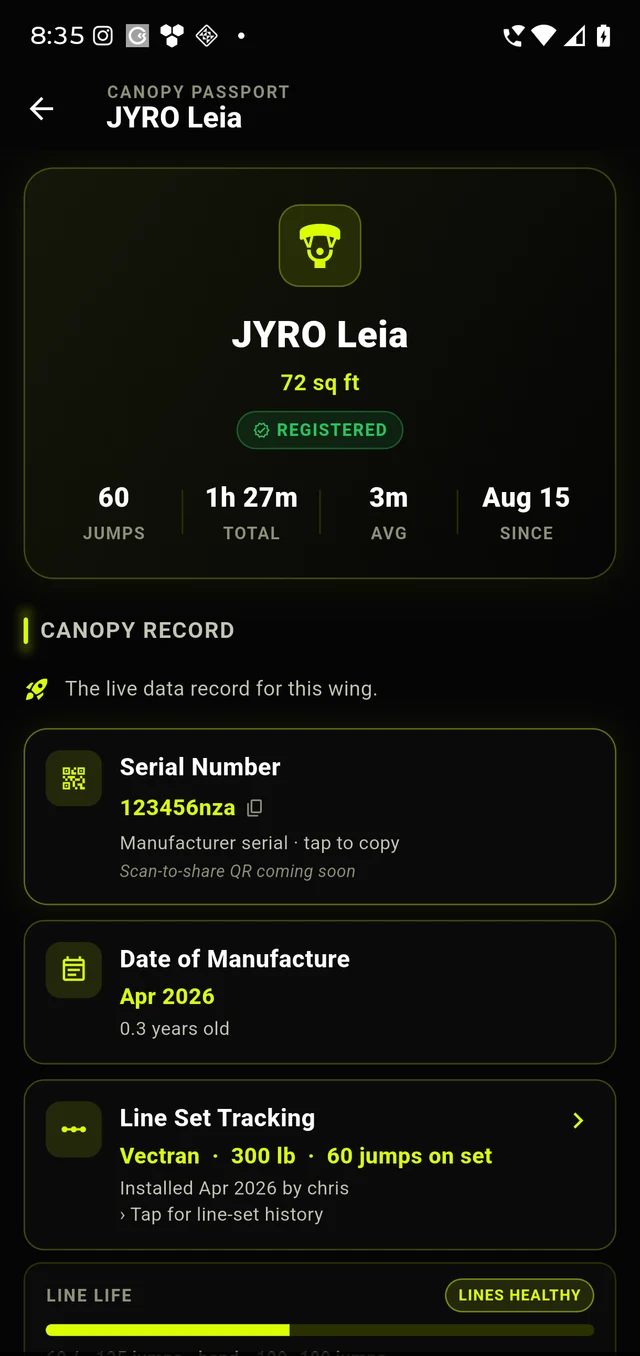
The Canopy Passport screen for a JYRO Leia 72 in the FlightX app, showing jumps, total canopy hours, average canopy time, registered-since date, the serial number, date of manufacture, line-set tracking and a line-life gauge.
The wingJumps, total canopy hours, average per jump, and registered since. Then the serial, the date of manufacture, and the current line set with its wear gauge.
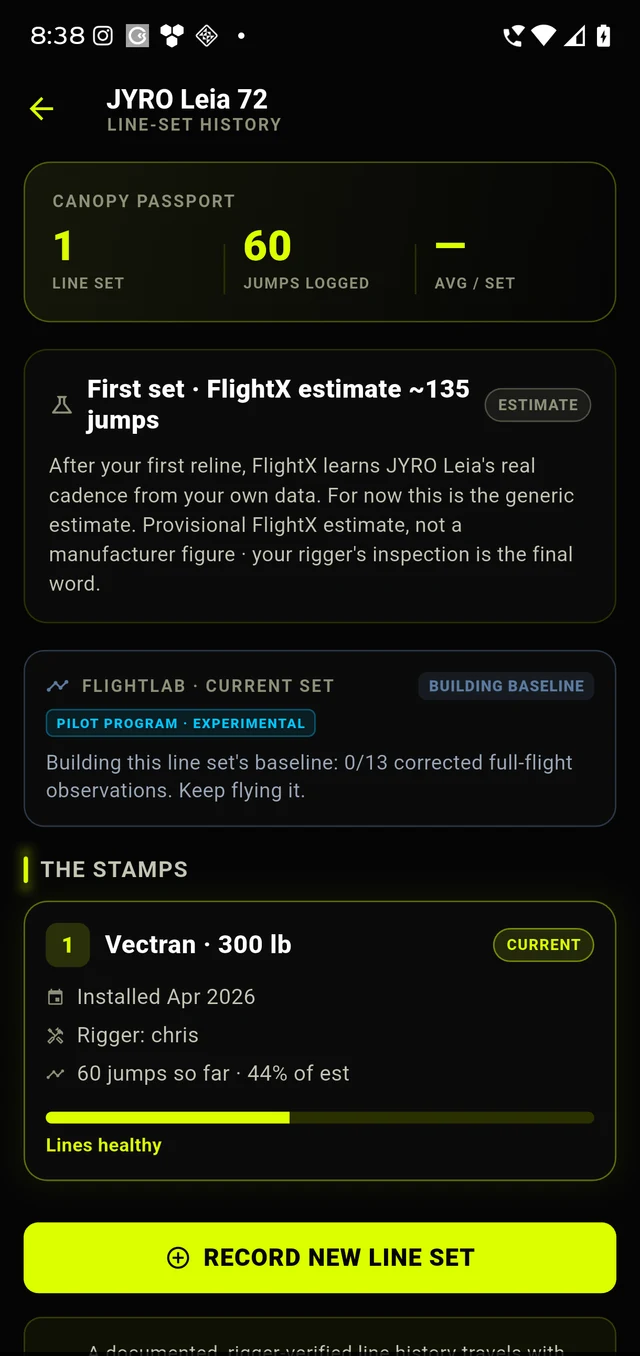
The line-set history screen, showing the number of line sets, jumps logged, a provisional FlightX reline estimate labelled as an estimate, and the current line set stamped with its material, break strength, install date and rigger.
Line-set historyEvery set is a stamp: material, break strength, install date, jumps on the set. The reline figure says estimate on its face, and says the rigger has the final word.
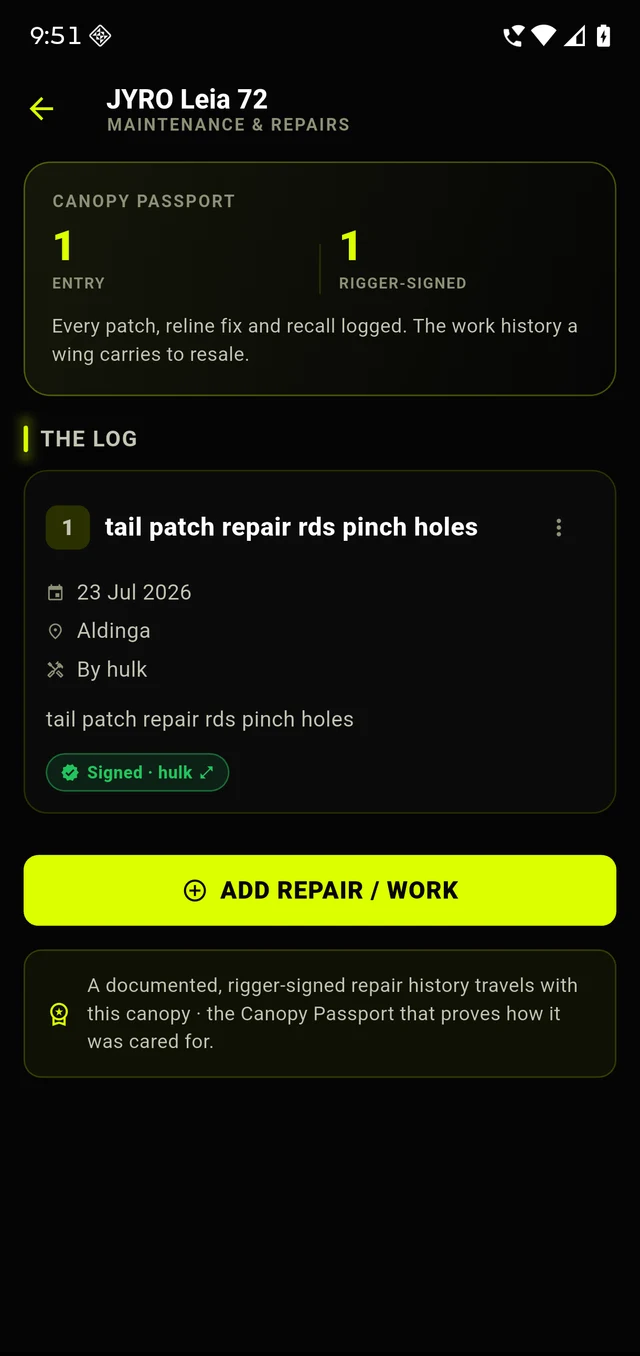
The maintenance and repairs screen, showing one logged entry with its date, place and the rigger who did the work, carrying a rigger-signed badge.
Maintenance and repairsEach entry carries the date, the place, who did the work and that rigger's own signature. A signed entry is the rigger's attestation, never our verification.

Note the serial on the first screen: you can read it because these are the owner's pages in their own app. It is blacked out on the advert a buyer reads, and the section below explains why. Rigger names sit against the entries the same way, visible to the owner and stripped when the record transfers to a new owner.

What FlightX witnessed

These are facts our own servers recorded. They are the ones worth paying for.

Jumps logged in FlightXCounted by the app on jumps flown on this wing, from the date it was registered.
Hours flownCanopy time, opening to landing. Not freefall. A wing wears by time under load, so hours catches what a jump count alone misses.
Registered sinceThe date the wing joined the passport. Everything before it is owner declared, by definition.
Line-set changes logged in the appMaterial, install date, and the jump count the set went on at.
Repairs with a rigger signatureDate, place, what was done, and the rigger’s own drawn signature.

What the owner declared

These are the owner's words. They stay labelled as the owner's words, on every surface, permanently. A declared figure never quietly becomes a logged one.

Make, model, size and date of manufactureEntered by the owner at registration, off the label.
Jumps before FlightXThe number the owner typed in when they registered the wing. A baseline, not a count.
Malfunction historyLogged by the owner: cutaways, broken steering lines, tension knots. Kept on the wing, including the bad days.
SerialRecorded for verification and never published. See below.

The life of a wing

  1. 1
    Register

    A wing joins the passport by serial, which is its permanent identity.

  2. 2
    Fly and log

    Jumps and hours accrue against the wing every time it is flown with the app.

  3. 3
    Service and sign

    Line sets and repairs are stamped, and a rigger signs the ones they did.

  4. 4
    Sell

    A dated PDF snapshot of the passport rides on the Hangar Bay listing.

  5. 5
    Transfer

    The service history follows the serial, not the seller. Personal data does not travel.

  6. 6
    Next pilot

    The new owner inherits the wing’s whole mechanical life on day one, and keeps logging.

Identity severed by design: no names, no signatures and no personal data cross between owners. What travels is the wing's mechanical life.

Why the serial is blacked out

A serial is a wing's permanent identity, which is exactly why it is worth stealing. Post one publicly and it gets cloned onto a fake advert on another platform, so a scammer's listing carries a real serial that checks out. We used to publish the last four digits behind a mask. That was still too much: the last four alongside make, size and date of manufacture is often enough to confirm a real serial. So the advert publishes none of it. Not in full, not in part, and not in a photograph. You still see your own serial in the app, exactly as shown above, because it is your wing. What changes is what a stranger can read. It is recorded so a stolen-gear report can be matched against it, and it transfers with the passport when the wing sells.

What this is not

What the passport does

  • Keeps a wing's service and incident history in one place, keyed to the wing.
  • Separates what FlightX recorded from what an owner typed, and says which is which.
  • Carries a rigger's own signature on the repairs that rigger did.
  • Shows gaps as gaps. An honest record with a hole in it is still worth more than a blank.
  • Moves to the next owner so the history does not restart at zero.

What it is not

  • Not an airworthiness certificate. A rigger with the gear in their hands is the only thing that can tell you a canopy is fit to jump.
  • Not a FlightX verification of a repair. A rigger-signed entry is that rigger's attestation. We never claim we checked a canopy.
  • Not a suitability call. Whether a wing suits you belongs with your coach and your rigger.
  • Not a valuation. It tells you what happened to the wing, not what it is worth.
  • Not proof of ownership. It is a service record, not a title.

Starting a passport

The record is built in the FlightX app, because that is what is with you on the drop zone when the jump happens and when the rigger signs. Register the wing once by serial, and the jumps, hours, line sets and repairs accrue from there. Selling it later on Hangar Bay is then one tap, because the history already exists.

Worth being straight about the order. A passport that starts today records from today. Jumps already flown become a declared baseline, labelled as declared, forever. That is not a limitation we can engineer away: it is the honest consequence of not having been there. The wings worth the most on this marketplace will be the ones registered earliest.

Preview build: passport snapshots attach to listings when the founding sellers open. Nothing on Hangar Bay is a live listing yet.